Know what the records establish.
Distinguish an offer from an award, an award from a receipt, and proposed staffing from confirmed capacity.
 A Nashville Analytics product
Weaver 0.9 · Nonprofit prototype
Weaver connects your financial and program records with plans, meetings and team commitments so leaders can see what needs attention, understand the constraints and move the work forward. Assess funding choices alongside the daily decisions that keep your mission operating well.
Prototype 0.9 · Email-verified access · Fictional records · Human decisions
Can we accept this opportunity without promising more than we can deliver?
Prepare a phased response. Review funding restrictions, the reserve floor, and confirmed delivery capacity before committing.
A visual guide to the workspace
Eight pages explain the five main workspace areas, named responsibilities, connected reports and grant package readiness, with separate Reference and Admin guidance. The screenshots come from the current fictional nonprofit workspace.
Open the visual guide →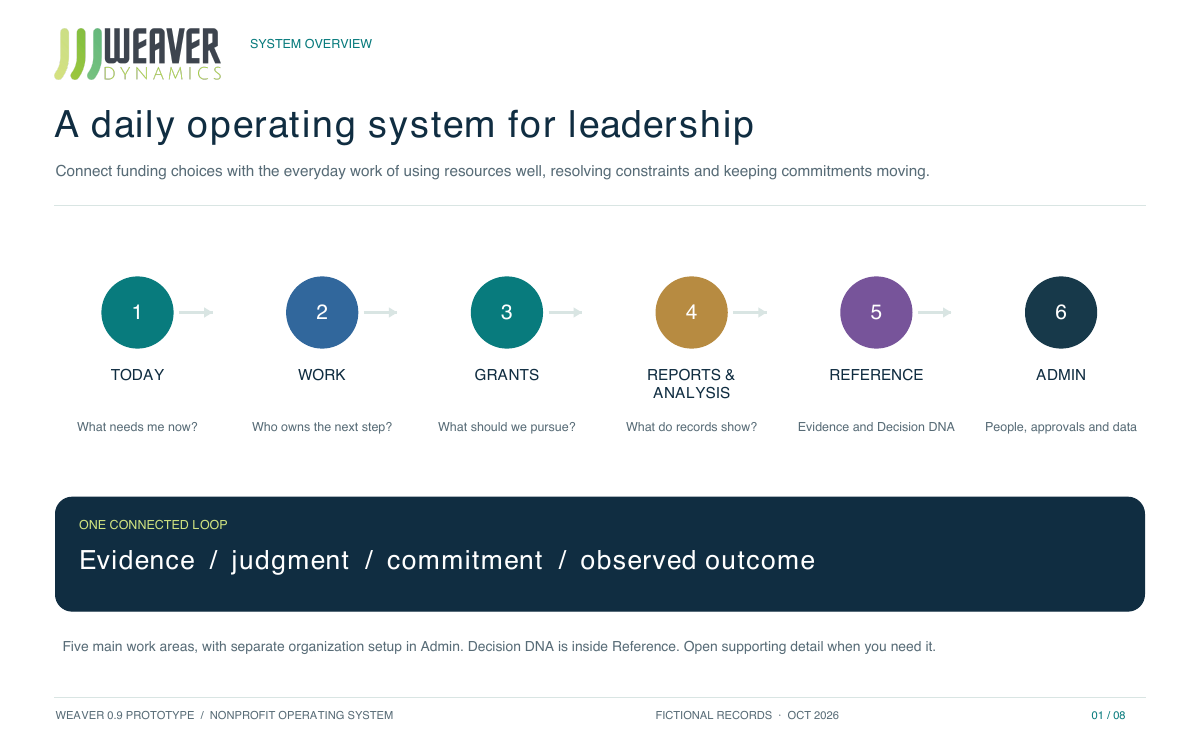
Simplicity in engagement
Start each day with what changed, which work needs attention and where leadership can unblock delivery. One standard view brings the next contribution into focus. Use Explore context for the supporting documents, calculations, assumptions or history.
Today ranks the matters relevant to your responsibilities and shows recorded changes, urgency and the next contribution.
Connect workloads, costs, service demand and handoffs. Compare adjustments before making another commitment.
See completed steps, blockers and the next owner. Keep preparation, independent review, approval and receiving acceptance distinct.
Follow accepted work and review outcomes over the week. Keep the evidence and decision history connected.
How the evidence reaches the decision
Financial and operational records establish quantities and constraints. Authorized conversations, meetings, documents and plans supply context. Weaver brings the permitted evidence into a cited draft, with missing information and competing explanations kept visible.
Identify the decision, current role and work that needs review.
Limit retrieval to the current organization, source permissions and exact work scope.
Bring the relevant permitted records and organizational context together.
Check source versions, missing conditions and conflicting evidence before constructing context.
Keep recorded facts, calculations, assumptions and provisional interpretation distinct.
Assigned people review, decide and accept the exact scope. A generated draft grants no authority.
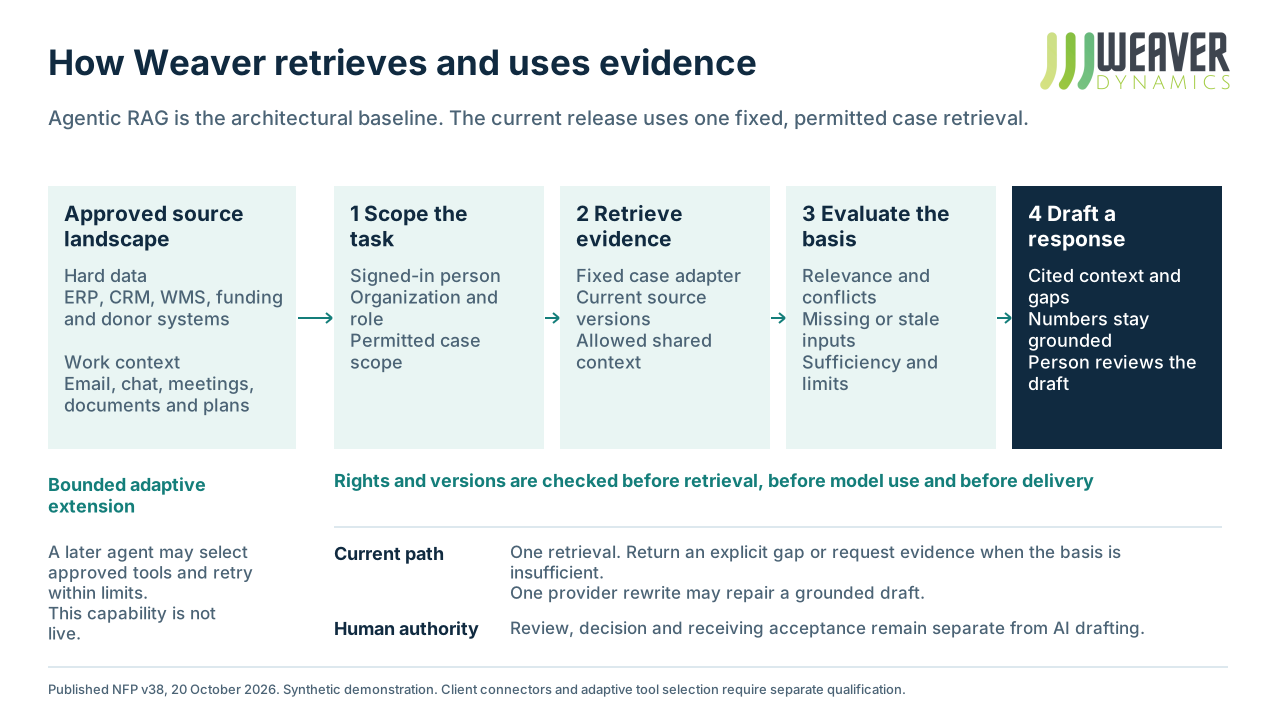
The current synthetic demonstration uses one fixed permitted-case retrieval adapter and a bounded response check. It does not autonomously choose arbitrary tools, browse mailboxes or connect client systems. Additional approved retrieval tools and adaptive search are future implementation and qualification work; an agent cannot relax permissions to fill a gap.
Decision DNA
A strategic plan describes your direction. A meeting records a condition. An email changes the requested scope. Decision DNA interprets permitted evidence through six business lenses, so your team can examine how the organization approaches a decision and where requirements may pull in different directions.
Distinguish an offer from an award, an award from a receipt, and proposed staffing from confirmed capacity.
Inspect permitted emails, meeting records, documents, and strategy alongside the financial and operational evidence.
Inspect the exact source version, alternative explanation and limits behind a finding. A prepared interpretation does not approve a decision, change authority or become an employee score.
In the demonstration, a versioned authored assessment connects the fictional corpus to six positions and shaded interpretive confidence bands. Read the organizational narrative, then follow each lens to its source originals, exact versions and alternatives. The bands express interpretive uncertainty, not statistical confidence. A changed or unavailable source can withdraw a prepared finding. Organizational approval and recurring pattern learning remain separate.
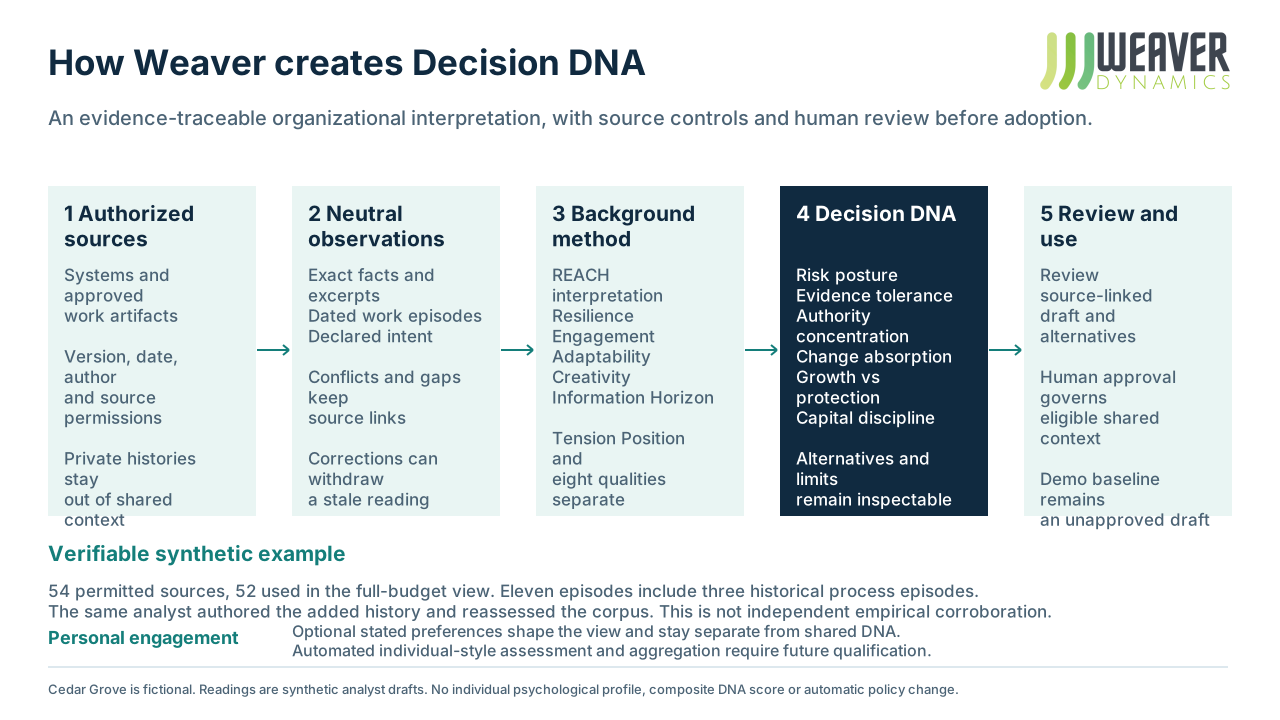
REACH supplies five background questions: Resilience, Engagement, Adaptability, Creativity and Information Horizon. Tension Position and eight categorical Tension Quality readings are considered separately. These describe the permitted work and its context; they do not establish personality traits.
Individuals can state optional working preferences to guide engagement. Those preferences are separate from shared Decision DNA and confer no access or decision authority. Private preparation and personal chat histories do not become a shared organizational corpus. Further automation of individual style assessment or organizational learning requires its own evidence, permissions and review.
One connected leadership workspace
Finance, Programs, Development, Operations, People, Marketing and executive leadership share a common decision record. Each person starts with their own responsibilities, while the team can see how the work connects.
Compare options, inspect the supporting context and follow a decision through review, assigned ownership and an observed outcome.
Weaver is designed to work with your accounting, fundraising and program systems. The current demonstration uses fictional records across twelve workflows and seven departmental experiences. Connecting your systems and qualifying production use are part of a scoped implementation.
Decisions stay with authorized people. The demonstration does not execute financial transactions, send organizational communications or make personnel decisions.
Implemented by Nashville Analytics
Our team brings nonprofit executive and operating experience alongside data engineering, architecture, software development and AI. James Suh, Mike Rossi and Jennifer Hill bring nonprofit leadership and sector experience, with Kai Chang contributing nonprofit and AI expertise. Nashville Analytics technical delivery is led by Holden Penley. We connect financial, CRM, grants and program data to the decisions the organization needs to make. Jennifer has expressed interest in participating; formal Weaver roles remain to be agreed.
Choose a recurring question, the people involved, and a useful output.
Approve the organization, roles, source permissions, and processing route before connecting client information.
Validate the workflow, evidence, handoffs, and usability with the intended team.
Add qualified capabilities as the team demonstrates value and confidence.
A clearer next decision
Explore the synthetic workspace, then discuss a bounded implementation around your organization’s systems and responsibilities.